Why Updating .NET Matters: A Small Async/Await Example
Software Engineers usually treat framework upgrades as a regular maintenance task that accomplishes a range of things. Upgrade packages. Fix compilation problems. Run tests. Ensure everything works fine. Sometimes, however, an upgrade provides not only compatibility but also additional performance benefits, where the same source code can be executed faster or use less memory due […]
Project Tips and Tricks

Software Engineers usually treat framework upgrades as a regular maintenance task that accomplishes a range of things. Upgrade packages. Fix compilation problems. Run tests. Ensure everything works fine.
Sometimes, however, an upgrade provides not only compatibility but also additional performance benefits, where the same source code can be executed faster or use less memory due to optimization of the underlying platform.
The case of modern .NET’s async/await optimizations recently snagged my attention.
Why Async/Await Matters
In backend development, async/await is used everywhere. From API calls to database requests to file operations, external integrations, and background jobs.
The main idea is simple. When an application waits for something slow, it shouldn’t block the current thread.
This code looks simple, but behind the curtain, the compiler usually rewrites async methods into generated state machines. While this works well, but it also creates extra internal code and can add overhead too.
Runtime Async in .NET 11 Preview
Runtime Async is one of the cool experiments in .NET 11 Preview.
The concept behind this is that it will shift some of the async-related stuff to be managed by the .NET runtime rather than being handled by compiler-generated state machines. The code we write remains identical from the developer’s perspective.
But internally, the runtime can handle more of the async logic directly. This can make generated IL smaller and simpler, reduce overhead, and improve debugging.
My Small Benchmark
To test this idea, I created a small local benchmark and compared the same async-heavy code on
- .NET 10
- .NET 11 Preview with Runtime Async enabled
The benchmark repeatedly awaits a small async method and stores the returned values in a list.
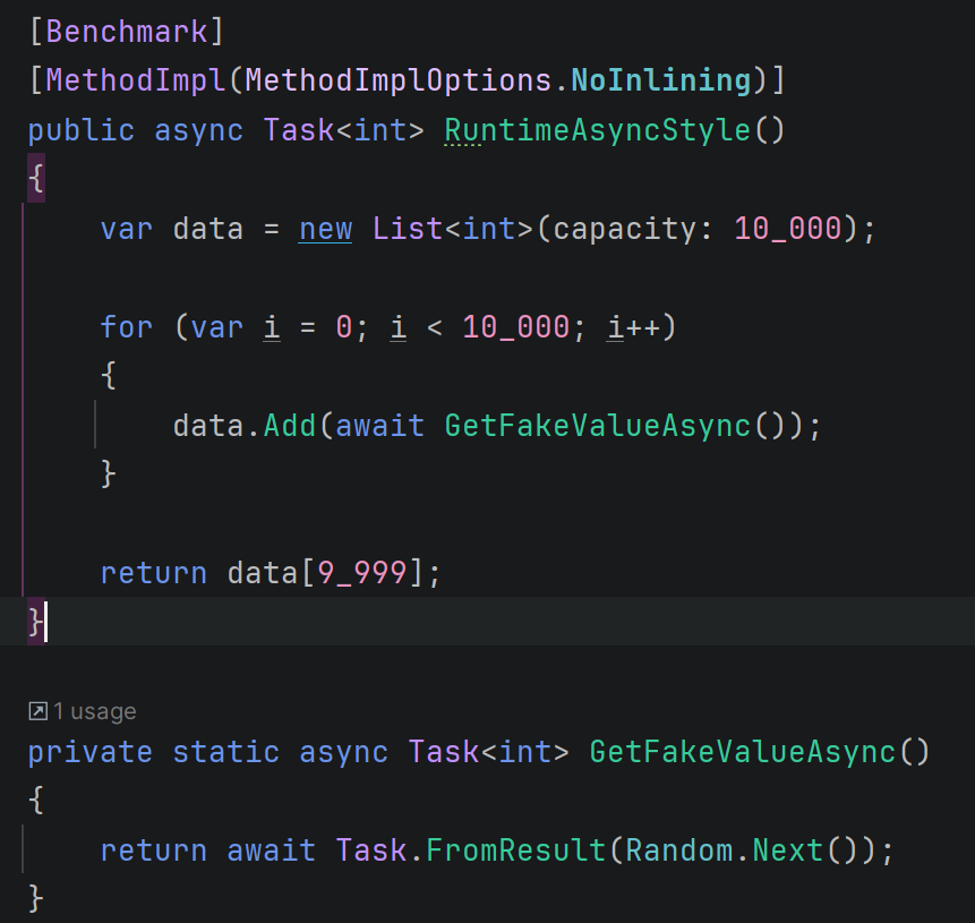
For the .NET 11 Preview test, I enabled Runtime Async in the project file.
What I Discovered
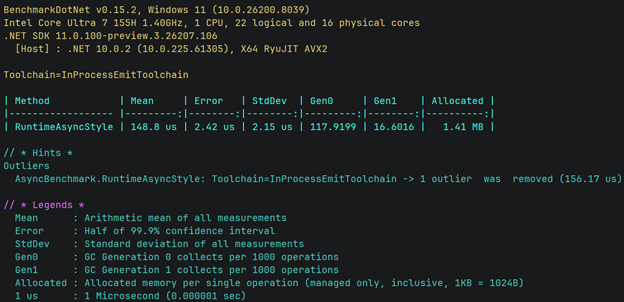
.NET 10 benchmark result on Intel Core Ultra 7 155H, Windows 11, BenchmarkDotNet 0.15.2.
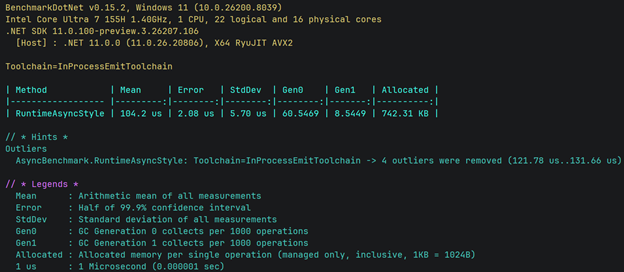
.NET 11 Preview with Runtime Async enabled on the same machine and benchmark code.
In my test, the difference was noticeable.
| Version | Mean | Allocated |
| .NET 10 | 148.8 us | 1.41 MB |
| .NET 11 Preview + Runtime Async | 104.2 us | 742.31 KB |
In this particular benchmark, .NET 11 Preview with Runtime Async was nearly 30 percent faster and used about 49 percent less memory.
That doesn’t mean our applications will suddenly become fast once we upgrade to the new framework version. However, this example does prove a very significant point. That it is possible to achieve better performance even without making any changes to the application itself.
For me, this was a good reminder that updating .NET is not only about new syntax or new APIs.
Sometimes the real value is deeper. Found in better runtime performance, lower memory usage, cleaner generated code, and easier debugging.
Runtime Async is still a preview feature, so it should be tested carefully. But it clearly shows the direction of modern .NET.
The same familiar code, with a smarter runtime underneath.
If you need a technology partner, find out how Swan Software Solutions can help. Schedule a free assessment.