Azure App Services Web App Environment Configurations Dynamic Update
Azure App Service is a platform that lets you run web applications, mobile backends, and RESTful APIs without managing the underlying infrastructure. Azure App Service web apps allow setting environment variables that the app needs at startup or at runtime. Azure Web App allows asking for an environment variable update state. This feature allows dynamically […]
Technologies

Azure App Service is a platform that lets you run web applications, mobile backends, and RESTful APIs without managing the underlying infrastructure.
Azure App Service web apps allow setting environment variables that the app needs at startup or at runtime.
Azure Web App allows asking for an environment variable update state. This feature allows dynamically reading changed environment data one at a time or all changed environment data at once, using another environment variable that acts as a trigger as soon as this variable changes.
How does it work?
Include the application configurations to apply a dynamic update.
There are two flows:
- The app needs to refresh the configuration value as soon as it changes in the Azure web app environment.
- The app needs to refresh all the environment config values in the application at once.
For the first flow:
- Add an environment variable to the Azure web app.
- Add the appropriate configs that need to be included in the application. For example, in Spring Boot, you need to provide cloud.azure.appconfiguration.stores properties with monitoring properties and sets the enable to true:
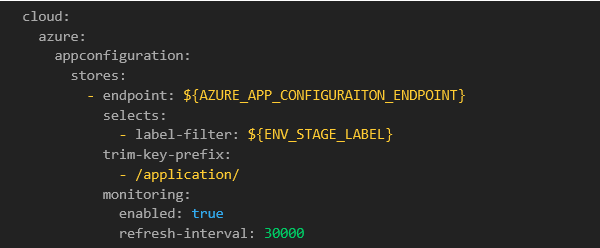
The application would ask Azure for the environment data changed state since the last time the application asked for the changes, and if so, the application thread will poll the environment values every interval milliseconds. If it determines that the environment configs have changed, the app would refresh the values at runtime.
For the second flow, an additional environment variable that would act as a trigger with a specific name is needed in the Azure web app. To enable this feature in the app, add configs to the existing ones using the trigger environment variable.
First, in the Azure web app, set the environment variable RefreshConfigVersion to 1. Then, in a Spring Boot app, this is what needs to be provided in the application.yml file under the monitoring property, with or without a label:

Use case:
If RefreshConfigVersion changed from 1 to 2, the application asks an Azure web app for the RefreshConfigVersion eTag state. If the Azure response is positive, the application will poll all changed environment configuration values and refresh them in the application at runtime.
Why would a company need it?
An Azure web app allows for the dynamic refresh of the environment’s data or the use of a trigger to populate them all at once. Compared to Spring Boot Config Service, no extra dependencies, Message Broker, or web-hooks are needed. This works for a specific web app, but this is not a centralized place for all the web apps.
If the business needs an immediate, critical, or fast update for its users, and the Azure App Services web app is already in use, there is a great opportunity to utilize these features.
If you need a great technology partner to help your company, contact us to find out how we can help.